 Stephen Weber
The Vibe Coding Playbook: How to Build Any Website from Scratch Using Cursor
Code examples are available in the original article.
** Example Project:_Anaheim Krav Maga — a self-defense studio website designed to generate local leads. _Goal:_Emotionally resonant, visually high-impact site that converts visitors into sign-ups. _Core Tech Stack:_Next.js + TypeScript + Tailwind + Shadcn/UI, deployed to Vercel. _IDE:**Cursor (for AI-assisted generation, multi-file edits, and iterative refinement).
What Is “Vibe Coding”?
Most developers start with wireframes, components, or sitemaps. Vibe coders start with energy.
Vibe coding is a creative-first approach to building websites — where you code based on the feel, personality, and flow of the brand, not just specifications. You let AI (via Cursor, Claude, or ChatGPT) handle mechanics while you guide the vibe : tone, rhythm, emotion, and brand identity.
It’s not about skipping structure — it’s about sequencing creativity before architecture.
Why I Built the Anaheim Krav Maga Site This Way
When I offered to build a site for my Krav Maga coach, I didn’t want another cookie-cutter martial arts template. I wanted something that felt like our gym — focused, direct, and intense but welcoming.
So I built it entirely inside Cursor — AI handled scaffolding and content generation while I directed the design, brand, and feel. What emerged became a repeatable 16-step playbook for vibe-coding any website from scratch.
🚀 PHASE 1 — Foundation & Strategy
1. Discovery & Business Intent
Objective: Understand why the site exists, who it’s for, and what emotions it should evoke.
Actions:
- Conduct a 30–45 minute conversation with the business owner.
- Identify:
- Primary goal (e.g., increase trial-class signups)
- Brand tone (e.g., serious and empowering, not aggressive)
- Aesthetic direction (e.g., strong black/red palette, confident typography)
- Core conversions (e.g., “Book a Free Class”)
2. User Research
Objective: Understand your audience’s motivations, fears, and decision triggers.
Define 3–4 user personas — e.g.:
- Working parent seeking confidence
- Young adult wanting fitness + self-defense
Summarize each persona’s pain points, objections, and motivators.
Prompt Example: User Research Prompt → Gist Link
3. Deep Subject Research
Objective: Gather credible, original content to inform copywriting, SEO, and credibility. Feed this report to the SEO research prompt and the copywriter prompt to make them experts.
I typically use Google Gemini for long-form, factual research. Once you've conducted the deep research, you can export it to Google Docs and then export it to Markdown format for later reading.
Prompt Example: Deep Research Prompt → Gist Link
**Deliverable: ** Markdown file with results.
4. Competitor & SEO Research
Objective: Identify content and design trends that perform in your niche.
Actions:
- Analyze 5–10 competitor websites (gyms, dojos, martial arts studios).
- Note tone, layout, structure, and conversion tactics.
- Collect high-performing keywords for your target market.
Prompt Example: Competitor & SEO Prompt → Gist Link
5. Synthesize Into Brand Direction
Deliverable:
/.cursor/rules/brand.mdc
Summarize the results into a One-Page Brand Blueprint that includes:
- Core brand vibe (keywords like confident, practical, urban strength)
- Color palette & typography guidance
- Emotional tone
- Key SEO targets
This blueprint becomes the foundation for every design and copy decision.
6. Create an AI Copywriter for the Website
Objective: Develop a unified copywriting assistant that writes in your brand’s tone, uses SEO insights, and maintains consistent emotional resonance across all pages.
Goal:
Generate a Markdown-based copywriting rule file (/.cursor/rules/copy.mdc) that Cursor can use to produce and refine on-brand, conversion-oriented copy throughout the project.
Actions:
- Feed Context:
- Brand blueprint (
brand.mdc) - PRD (
prd.mdc) - SEO (
seo.mdc) and competitor research results - Deep research results (industry-specific insights)
Prompt:
https://gist.github.com/weber-stephen/69f62c904e0b5a23cb1d7e9e55ca7430
Outcome:
You now have a persistent copywriter.mdc that ensures every AI-generated or refined section — from home hero text to FAQ answers — stays true to your brand’s identity, tone, and goals.
🧱 PHASE 2 — Architecture & Planning
1. Define Site Structure
Objective: Create a sitemap that supports user flow and business goals.
Example:
 / (Home)
/classes
/instructors
/schedule
/contact
/faq
Prompt Example: Site Structure Prompt → Gist Link
2. PRD & Design Specification
Objective: Translate strategy and research into functional and aesthetic specifications.
Deliverables:
/.cursor/rules/prd.mdc→ Goals, features, integrations (forms, analytics, SEO)/.cursor/rules/design.mdc→ Visual tone, UI/UX principles, component rules
Prompts:
Make sure these files reference your earlier User Research, SEO analysis, and Brand Blueprint.
3. Tech Stack & Architecture
Objective: Select tools that balance performance, maintainability, and developer velocity.
Baseline Recommendation:
- Framework: Next.js + TypeScript
- Styling: Tailwind + Shadcn/UI
- Animations: GSAP (optional)
- Hosting: Vercel
- Analytics: Google Analytics or PostHog
Prompt Example: Architecture Prompt → Gist Link
Save the output as /.cursor/rules/architecture.mdc.
Set Technology Standards
Visit cursor.directory and select Cursor rules that match your stack.
Save the selected rules in /.cursor/rules/tech.mdc.
💻 PHASE 3 — Building in Cursor
1. Create Repo & Documentation
Use the Next.js `create-next-app` to create the application with the latest version of Next.js
Make sure the cursor rules are setup and configured:
 /src
/.cursor/rules
  brand.mdc
  prd.mdc
  design.mdc
  architecture.mdc
  tech.mdc
  copy.mdc
  page.mdc
  testing.mdc
2. Build the Homepage (Anchor Page)
The homepage sets your entire vibe — layout rhythm, color tone, and voice.
Process:
- Set the PRD and Design Spec in Cursor to always apply.
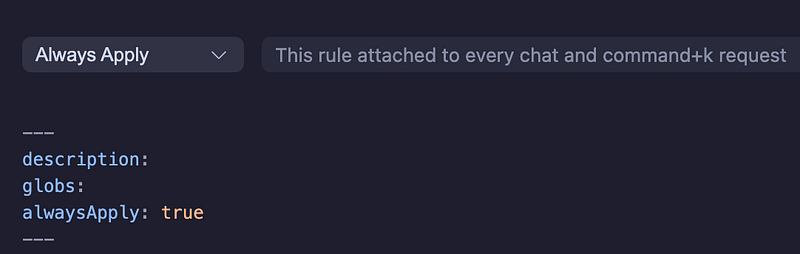
- Generate the homepage in iterative passes:
- Layout → Copy → Aesthetic Adjustments → Animations → Component Extraction
- Save components into
/components/uifor re-use.
Prompt Example:
“Act as a senior front-end developer. Using the PRD and Design Spec, generate the homepage for Anaheim Krav Maga using Shadcn/UI and Tailwind. The site should feel confident, modern, and conversion-focused.”
Then iterate:
“Tighten spacing, use darker tones with red accents. Add fade-in animations for CTAs and smooth scroll for the hero section.”
After you have the homepage built, tell Cursor to save the layout, spacing, and structure to a cursor rules file for other pages to use.
3. Build Remaining Pages
Once the homepage is solid, generate the remaining pages based on page.mdc.
Use extracted components for consistency and efficiency.
Prompt Example:
“Generate a layout and page for Corporate Self-Defense Seminars using
_prd.mdc_and_copy.mdc_for context.”
4. Testing with Jest & Playwright MCP
Objective: Validate UI consistency and interactive behavior.
Use both Jest for unit testing and Playwright MCP for live browser validation.
Prompt Example: Testing & Vibe QA Prompt → Gist Link
Save findings in /.cursor/rules/testing.mdc.
5. SEO & Metadata Setup
Generate metadata JSON files for each page early.
Prompt Example:
“Generate SEO metadata as JSON using our PRD keywords and SEO document.”
{
  "home": {
    "title": "Anaheim Krav Maga | Real-World Self-Defense Training",
    "description": "Learn practical Krav Maga in Anaheim with certified instructors. Build confidence, strength, and safety.",
    "slug": "/"
  }
}
🚀 PHASE 4 — Finalization & Launch
1. Deploy to Vercel
- Run all tests.
- Push to GitHub.
- Deploy via Vercel.
- Verify metadata, OG images, and analytics tracking.
2. Continuous Refinement Loop
The “vibe loop”:Ideate → Generate → Review → Refine → Commit
This is where the artistry lives — iterating until the feel clicks.
- State your intention clearly to Cursor.
- Generate or refactor code.
- View it live.
- Refine tone, spacing, and vibe.
⚙️ Cursor-Specific Best Practices
Principle Action Context Injection Always keep PRD + Design Spec pinned. Cursor works best with complete context. Multi-File Editing Use @edit for coordinated component updates (e.g., nav across pages). Prompt-Feedback Loop Iterate visually with micro-prompts: “Too dark,” “Add gradient,” “Simplify hero CTA.” OMD Discipline Don’t extract components prematurely — let design evolve first. Vibe Testing Use “act as a vibe QA” prompts before final deployment.
🧩 Deliverables Summary
File Purpose
/.cursor/rules/brand.mdc Brand direction, tone, colors /.cursor/rules/prd.mdc Business goals, flows, features /.cursor/rules/design.mdc Visual tone, layout rules /.cursor/rules/copy.mdc Page copy and voice
/.cursor/rules/page.mdc Page structures
/.cursor/rules/architecture.mdc Stack and deployment /.cursor/rules/tech.mdc Tech standards
/.cursor/rules/testing.mdc QA and vibe testing checklist
🧠 The Meta-Flow of Vibe Coding
- Understand — the business, audience, and emotion.
- Synthesize — into a high-level vibe and direction.
- Generate — with AI inside Cursor.
- Refine — emotionally, visually, structurally.
- Systematize — extract reusable components.
- Ship — and evolve continuously.
🎯 Final Thoughts
Traditional workflow:
Requirements → Design → Copy → Code → Launch
Vibe Coding workflow:
Goals → Research → Copy → Layout → System → Code → Launch
By grounding creativity in a solid PRD and letting AI handle the mechanical work, you can build faster, sharper, and more emotionally intelligent websites.
For this Krav Maga website , this approach produced a handcrafted, conversion-optimized site in hours — not weeks.
Try this: Next time you start a web project, don’t open Figma. Start a conversation, write your PRD, and capture the vibe.