 Stephen Weber
Beyond Instructions: How Modern Prompting Turns AI Into a True Thought Partner
A practical guide to advanced prompting techniques — when to use them, why they work, and how to combine them effectively.
🧭 Table of Contents
- The New Era of Prompting
- The Building Blocks: 8 Advanced Prompting Methods
- How to Choose the Right Technique
- When Advanced Prompting Isn’t Worth It
- Real-World Examples: From Good to Great
- Your Prompting Decision Framework
- Key Takeaways
1. The New Era of Prompting
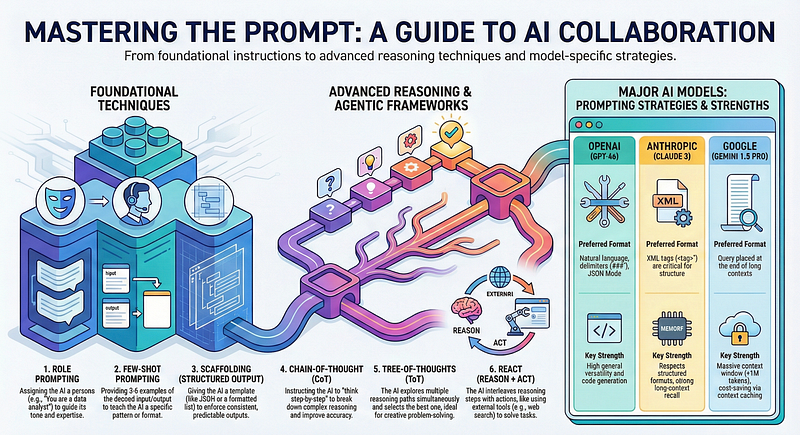
Prompting isn’t just about giving instructions anymore — it’s about designing thought processes for AI.
Modern models like GPT-5, Claude, and Gemini can reason, reflect, and even collaborate with themselves when guided correctly. But with that power comes a cost: the more structured your prompt, the more tokens and time you spend.
There’s always a “Reliability vs. Cost” trade-off:
- Highly structured prompts → more consistent
- Looser prompts → faster and cheaper (but less predictable)
And each model has its own quirks:
- Claude → loves XML and structured formats
- Gemini → gives best answers when the actual question is at the end
- GPT-5 → thrives with reasoning chains and multi-step workflows
The real skill isn’t memorizing techniques — it’s knowing which one to apply when.
2. The Building Blocks: 8 Advanced Prompting Methods
Below are the eight most powerful prompting techniques, explained simply and practically.
1. Role + Task Prompting
What it is: Tell the model who it is and what to do.
Why it works: Sets the mental mode and reduces ambiguity.
Example Prompt:
You are a senior data analyst. Explain the key insights from this dataset in plain English for an executive audience.
Best for: tone, domain expertise, perspective Avoid when: you need strict reasoning or structured output
2. Chain-of-Thought (CoT)
What it is: Ask the model to think step-by-step.
Why it works: Forces logical breakdown and reduces errors.
Example Prompt:
Think through this step by step: If the train leaves at 2 PM and travels 80 km at 40 km/h, when does it arrive?
Best for: math, planning, debugging, strategy Avoid when: you want fast or creative output
3. ReAct (Reason + Act)
What it is: The model alternates between reasoning and tool usage.
Why it works: Enables retrieval, web search, and real-time problem solving.
Example Prompt:
Search for the latest Tesla stock price, then summarize the trend over the last week.
Best for: external data, tools, APIs Avoid when: you’re offline or token budget is limited
4. Tree-of-Thoughts (ToT)
What it is: Multiple reasoning paths, evaluated and refined.
Why it works: Ideal for creative exploration and complex decisions.
Example Prompt:
Generate three explanations for why Q3 sales dropped, then pick the most likely and justify it.
Best for: ideation, strategy, writing Avoid when: speed matters
5. Skeleton + Scaffolding Prompts
What it is: Provide a structured template or output shape.
Why it works: Increases consistency and reduces random behavior.
Example Prompt:
Summarize the article in this format:
- Core Idea
- Key Evidence
- Implications
Best for: reports, JSON, repeated formats Avoid when: you want unconstrained creativity
6. Meta & Self-Reflection Prompts
What it is: Ask the model to critique or refine its own answer.
Why it works: Self-correction creates higher accuracy.
Example Prompt:
Review your answer. Identify unclear steps and rewrite them.
Best for: improving reasoning, catching mistakes Avoid when: you need fast replies
7. Programmatic & Automated Prompting
What it is: Scripts or systems generate and test prompts automatically.
Why it works: Scales prompting beyond human bandwidth.
Examples:
- DSPy pipelines
- Guidance for iterative prompt transformations
Best for: production systems, agents, RAG workflows Avoid when: you’re still experimenting manually
8. Prompt Tuning & Few-Shot Hybrids
What it is: Use example pairs to “soft-train” the model.
Why it works: Anchors behavior to domain patterns.
Example Prompt:
Translate English to Japanese. Example: Hello → こんにちは Now translate: Thank you.
Best for: medical, legal, translation, niche domains Avoid when: examples are low-quality or too long
3. How to Choose the Right Technique
Here’s a simple chart for fast decisions:
Goal Best Techniques Avoid Logical reasoning CoT, ToT Role-only Creative work ToT, Role Strict skeletons Retrieval / Tools ReAct, Programmatic CoT-only Consistent formatting Skeleton, Scaffolding ToT Polishing accuracy Meta prompting Simple Q&A Scalable systems Programmatic, Tuning Manual steps
4. When Advanced Prompting Isn’t Worth It
Sometimes simpler is better.
- Overly complex prompts cause failure.
- Some tasks don’t need structure at all.
- Tree-of-thought can explode token cost.
- Too much scaffolding kills creativity.
If a simple prompt gets you 80% of the way, don’t escalate.
5. Real-World Examples: From Good to Great
Example 1 — Chain-of-Thought Upgrade
Before:
Write a short summary of this article.
After:
You’re a research assistant. Step through the article’s key points, then summarize them using this format:
- Core Idea
- Key Evidence
- Takeaway
Result: cleaner, more accurate summaries.
Example 2 — Using ReAct for Retrieval
Prompt:
Search the web for the latest OpenAI Dev Day date. After retrieving it, summarize the biggest announcements.
The model performs actions and reasons in one flow.
Example 3 — Meta Prompting to Self-Correct
Prompt:
Reevaluate your answer. Did you include the methodology and key findings? If not, revise.
Produces higher-quality expert-style summaries.
6. Your Prompting Decision Framework
Use this 5-step system:
- Define the problem. Logic? Creativity? Retrieval? Formatting?
- Start with the simplest technique. Don’t default to Tree-of-Thought.
- Layer techniques only as needed. Role → CoT → Skeleton → Meta
- Test for quality, cost, and consistency.
- Automate and template the winners.
7. Key Takeaways
- Prompting is designing cognition , not just writing instructions.
- Use complexity only when it truly improves outcomes.
- Different models want different styles.
- Advanced prompting is a collaboration , not micromanagement.
- Treat prompting as a skill you refine — not a bag of hacks.